By KeyXplore · Last updated: 15 November 2026, 11:05 pm IST · 9 min read
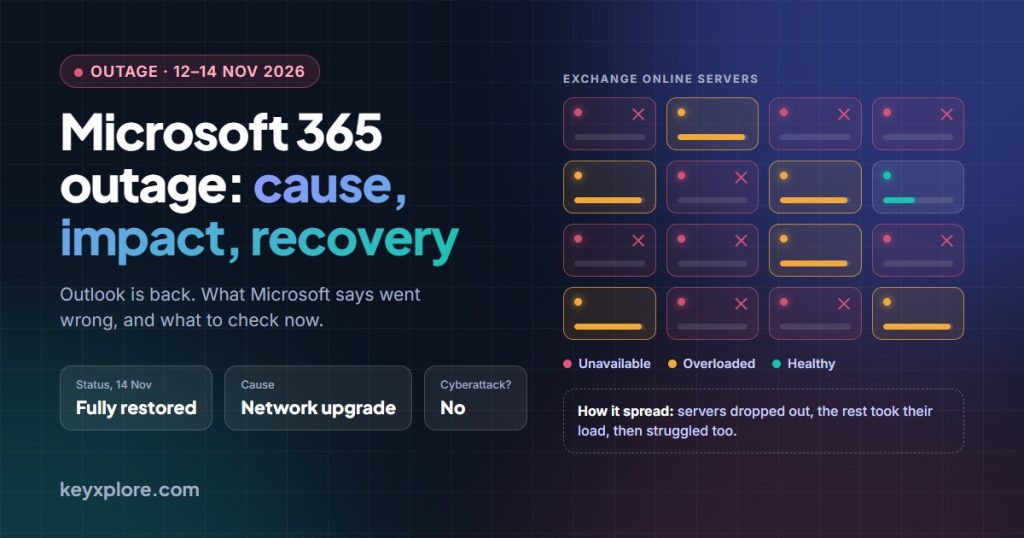
Status at 11:05 pm IST, 15 November: fully restored, and it has stayed that way. On Saturday morning (IST) Microsoft posted its final update: “We’ve confirmed that the services across the previously affected environments have fully recovered.” The backlog of delayed email has been processed and Microsoft’s status page shows all products as operational. Microsoft blames a problem during a network capacity upgrade and says it was not a cyberattack. Its detailed report on what went wrong is still to come; nothing had been published by late Sunday night (IST). Business customers can claim a service credit, but only if they ask for it.
If Outlook would not open for you on Thursday night or Friday, it wasn’t your laptop, your password or your office Wi-Fi. Microsoft 365 went into a worldwide outage on the evening of Thursday, 12 November, and for Indian offices it ran through most of Friday’s working day.
It is now over. Here is the full picture: what broke, what Microsoft says caused it, who was affected, how long it really lasted, and what you should check before Monday. Where something is still unconfirmed, we say so.
Is it fixed now?
Yes. This is the position from Microsoft’s final updates, as logged by an independent admin timeline and reported by news outlets.
- Service is back everywhere. Microsoft’s final incident update says the affected services “have fully recovered” and adds: “This is the final update for the event.”
- The email backlog is cleared. Microsoft says the messages that piled up during the outage have been processed.
- Both incidents are marked “service restored”. That covers EX1550543 (Exchange Online) and MO1550821 (Microsoft 365). The public status page reads “All products are operational.”
- The explanation is not finished. Microsoft has named the cause in one sentence. The full post-incident report had not been published when we checked late on Sunday, 15 November.
If your Outlook still misbehaves, it is now far more likely to be something on your side, such as an app that hasn’t reconnected. Restart it first; the steps are below.
How long did it last?
It depends on where you stop the clock. Microsoft’s record puts the end of impact at 9:40 pm IST on Friday, 13 November, just under 24 hours after mailboxes began failing. But it kept the incident open overnight while delayed email drained, and only gave the all-clear on Saturday morning, about 36 hours after the start. Both figures are in circulation; they measure different things.
What happened, in Indian time
The times below come from Microsoft’s own incident updates as logged by the same admin timeline and SecurityWeek, converted to IST.
| When (IST) | What happened |
|---|---|
| 12 Nov, 8:15 pm | A separate, shorter Teams problem starts in the Americas (delayed and failed chats). It is resolved by about 9:25 pm. |
| 12 Nov, 9:47 pm | The main incident begins: users cannot open their Exchange Online mailboxes. |
| 13 Nov, 12:48 am | Microsoft says the extra load is not from more traffic. A large number of its servers have unexpectedly become unavailable. |
| 13 Nov, 1:13 am | Affected servers fail automated health checks and are pulled out of service. |
| 13 Nov, 3:30 am | Microsoft: “our actions taken thus far have not provided the anticipated relief.” |
| 13 Nov, 5:30 am | Restarted servers “can become unresponsive again once they begin receiving traffic.” |
| 13 Nov, about 7:20 am | Microsoft starts reverting “a recent network configuration change that correlates with the start of impact.” |
| 13 Nov, 12:27 pm | Patches are applied and servers rebooted. “We have observed marginal success.” |
| 13 Nov, 12:59 pm | The turning point: “We’re seeing positive results for server stability.” |
| 13 Nov, 2:40 pm | Microsoft extends the email timeout window to 48 hours, so delayed mail keeps retrying instead of bouncing. |
| 13 Nov, 4:34 pm | Recovery is complete in parts of Asia Pacific. |
| 13 Nov, 7:30 pm | Email queues are “significantly reduced and approaching normal levels.” |
| 13 Nov, 11:27 pm | Microsoft apologises, names the cause and says it has “addressed the underlying issue.” |
| 14 Nov, 1:32 am | “We do not have an ETA for full recovery yet.” Queued email is still draining. |
| 14 Nov, 3:30 am | “Sustained service recovery” across affected regions. Microsoft keeps the incident open while it monitors the email backlog. |
| 14 Nov, about 9:20 to 9:45 am | Final update: services “have fully recovered” and the email backlog is processed. Both incidents are marked “service restored”. Microsoft records the end of impact as 9:40 pm on 13 Nov. |
| 14 Nov, 11:39 am | Microsoft 365 Status confirms on X that it has “completed our efforts to address the underlying issue” and restored the remaining customers and regions. |
Sources that log Microsoft’s updates give slightly different times for the final entry, which is why that row shows a range.
One clarification: this is a Microsoft 365 outage (email and the apps built around it). Microsoft’s incident does not list Azure, its cloud hosting business, even though complaint trackers showed a spike for Azure too.
What caused it?
What Microsoft now says
Late on Friday night (IST), Microsoft gave its first plain statement of the cause: “The incident was introduced by an issue during an earlier network capacity upgrade that surfaced following a recent network change.” In simple terms, work done earlier to add network capacity left a hidden fault, and a later network change brought it to the surface.
It also ruled out the two theories doing the rounds: “This was a technical issue not related to cyber or AI / agents.”
How the failure spread
- Many servers that handle Exchange Online dropped out at once. The servers still running had to carry the extra work, and they began to struggle too.
- On the affected servers, the process that sets up secure connections was “becoming overwhelmed”, so those servers stopped answering requests.
- The servers then failed health checks, the automatic tests that decide whether a server is fit to receive traffic, and were removed from service.
- Servers that were restarted fell over again as soon as real traffic reached them. That relapse is why the fix took most of a day.
What we still don’t know
- The details. Microsoft has not said what exactly went wrong in the capacity upgrade, which network change exposed it, or why its safeguards didn’t contain it.
- Whether the health-check system itself made things worse by pulling healthy servers out. One academic expert has suggested this, but it is his reading of Microsoft’s updates, not a confirmed fact.
- Whether Azure networking was involved. One report, citing unnamed sources, links the outage to configuration changes in Azure virtual networks. Microsoft has not confirmed this.
Microsoft has promised a full post-incident report, its formal write-up of what went wrong and what it will change. It has not announced a date. Trackers that mirror Microsoft’s incident notices report the usual schedule: a preliminary report within two business days and a final one within five, which would put the first around the middle of next week. Treat that as expected, not promised.
The outage began two days after Microsoft’s monthly security updates. Microsoft has not linked the two, and we have seen no evidence that they are connected.
Who and what was affected
- Email: Outlook on the web, the desktop app and phone mail apps could not reach mailboxes. Email that did get through was delayed, in some cases by many hours.
- Teams: chat and meetings mostly kept working, but calendars, scheduling and creating new chats failed for some.
- Copilot, SharePoint, Planner, To Do and Power Apps: features that depend on your mailbox or calendar did not load. Files stored in SharePoint still opened.
- Security and admin tools: parts of Defender, Purview and Intune were affected, which made life harder for IT teams during the outage.
Complaint tracker Downdetector logged roughly 130,000 to 140,000 Outlook problem reports worldwide at the peak, depending on which outlet you read, and said Microsoft products were affected in 74 countries and territories. These are user reports, not a count of affected accounts, so the real number of people affected is certainly higher.
In India
The outage started late on Thursday night here, so most people met it on Friday morning. Downdetector showed 2,157 Outlook reports from India at 11:42 pm on 12 November and about 1,960 at 8:42 am on 13 November, and Indian users were still reporting problems into late morning. Microsoft’s first report of complete recovery in parts of Asia Pacific came at about 4:30 pm on Friday; it did not name countries.
Airlines were the most visible casualties. IndiGo told customers “our email support services are currently impacted, and we may not be able to receive your emails”, and Akasa Air gave a similar warning. Air India said its flights were unaffected and that it was answering emails within its usual 24 hours. No flight cancellations have been linked to this outage; the damage was to email, not operations.
What to do now
If you are a user
- If Outlook is working, carry on. You don’t need to reinstall Office, rebuild your Outlook profile or reset your password.
- If it still won’t connect, close Outlook completely and reopen it, or sign in at outlook.office.com. If the web version works and the app doesn’t, the problem is on your device; tell your IT team rather than changing settings yourself.
- Missing an email from Thursday or Friday? Microsoft says the delayed mail has been delivered. Check your Junk folder, and if something important, such as an interview link or a payment confirmation, still isn’t there, ask the sender to resend it. Some senders’ systems may have given up before the outage ended.
- Check what you sent. Look in your Outbox and Drafts for messages that never left, and check that meeting invites sent during the outage reached people.
- Be alert for scams. Outages attract fake “Microsoft support” calls and “restore your mailbox” or “claim compensation” links. Microsoft will not ask for your password. Our guide to spotting AI-driven fraud covers the warning signs.
If you run IT for an office
- Confirm in Service health that EX1550543 (Exchange Online) and MO1550821 (Microsoft 365) show as restored for your tenant, and save the incident history.
- Check your mail flow: look for stuck or late messages and bounce notices, and if you run a hybrid setup, check the queues on your own servers too.
- Tell staff plainly that email is back, and ask them to check for replies and invites from Thursday and Friday that may have arrived late or not at all.
- When the post-incident report appears, download it and keep a copy. Service health keeps only 30 days of history.
- Decide whether to claim a service credit, and note your own start and end times of impact now, while they are fresh. Details are in the next section.
Can you claim a service credit?
If your office pays for Microsoft 365, probably yes. Microsoft’s standard agreement promises 99.9% uptime each month and gives a credit on your bill when it misses. Microsoft has not announced any compensation beyond this, and the credit is not automatic. The summary below follows an admin guide to the claim process; check the terms of your own agreement before you rely on it.
| Monthly uptime for the affected service | Roughly how much downtime (30-day month) | Credit |
|---|---|---|
| Below 99.9% | More than 43 minutes | 25% |
| Below 99% | More than 7.2 hours | 50% |
| Below 95% | More than 36 hours | 100% |
- Which tier? Microsoft’s own record shows just under 24 hours of impact, which points to the 50% tier for an office that was down throughout. Your figure depends on how long your own users were affected, so it may be lower.
- What you get: a credit against a future invoice for the affected service, not a cash refund. It does not cover lost business or staff time.
- How to claim: your admin opens a service request in the Microsoft 365 admin centre, quoting incidents EX1550543 and MO1550821, your start and end times, and how many users were affected. If you buy through a reseller, claim through them.
- Deadline: the end of the month after the outage, which is 31 December 2026.
- Home users: the uptime guarantee is for business and enterprise plans. Free Outlook.com accounts are not covered.
The lesson for later
Most offices now run email, chat, calendar, files and security from one supplier. That is convenient, and on days like Friday it means everything fails together. You don’t need a second email system. You do need a simple, written answer to “how do we reach staff and customers when Microsoft 365 is down?”, and it should be tested once, not just filed. Phone lists, a WhatsApp broadcast group and an offline copy of key contacts go a long way.
Frequently asked questions
Is the Microsoft 365 outage over?
Yes. Microsoft’s final update on Saturday, 14 November says services have fully recovered and the email backlog has been processed. Its status page shows all products as operational.
How long did the Microsoft outage last?
Microsoft records the impact as ending at 9:40 pm IST on 13 November, just under 24 hours after it began. It declared full recovery the next morning, about 36 hours after the start, once delayed email had been delivered.
Was the Microsoft outage a cyberattack?
No, according to Microsoft. It says the outage was “a technical issue not related to cyber or AI / agents” and that there is no indication of malicious activity. It blames a problem during a network capacity upgrade.
Did I lose emails sent to me during the outage?
Microsoft has reported delays, not loss, and says the backlog has now been delivered. It had extended the email timeout window to 48 hours so that waiting messages kept retrying. If something critical is still missing, ask the sender to resend.
Was Azure down as well?
Microsoft’s incident covers Microsoft 365 services. Azure’s status page showed no issue, although some users reported problems on complaint trackers. A report linking the cause to Azure networking is unconfirmed.
Will Microsoft compensate customers?
Not automatically. Business and enterprise plans carry a 99.9% uptime guarantee with service credits of 25% to 100% of the monthly fee for the affected service, and your admin or reseller has to claim by 31 December 2026. Microsoft has not announced anything beyond that. Ignore any message offering compensation through a link.
Where can I check the current status?
Microsoft’s public page at status.cloud.microsoft and the Microsoft 365 Status account on X. Admins should use Service health in the Microsoft 365 admin centre.
The outage is over; the full explanation is not yet out. Times and quotes are from Microsoft’s incident updates as reported by the sources linked above, checked at 11:05 pm IST on 15 November 2026. We will update this article when Microsoft publishes its post-incident report. KeyXplore is not affiliated with Microsoft. For the latest, check status.cloud.microsoft.