By KeyXplore · Last updated: November 8, 2026 · 12 min read
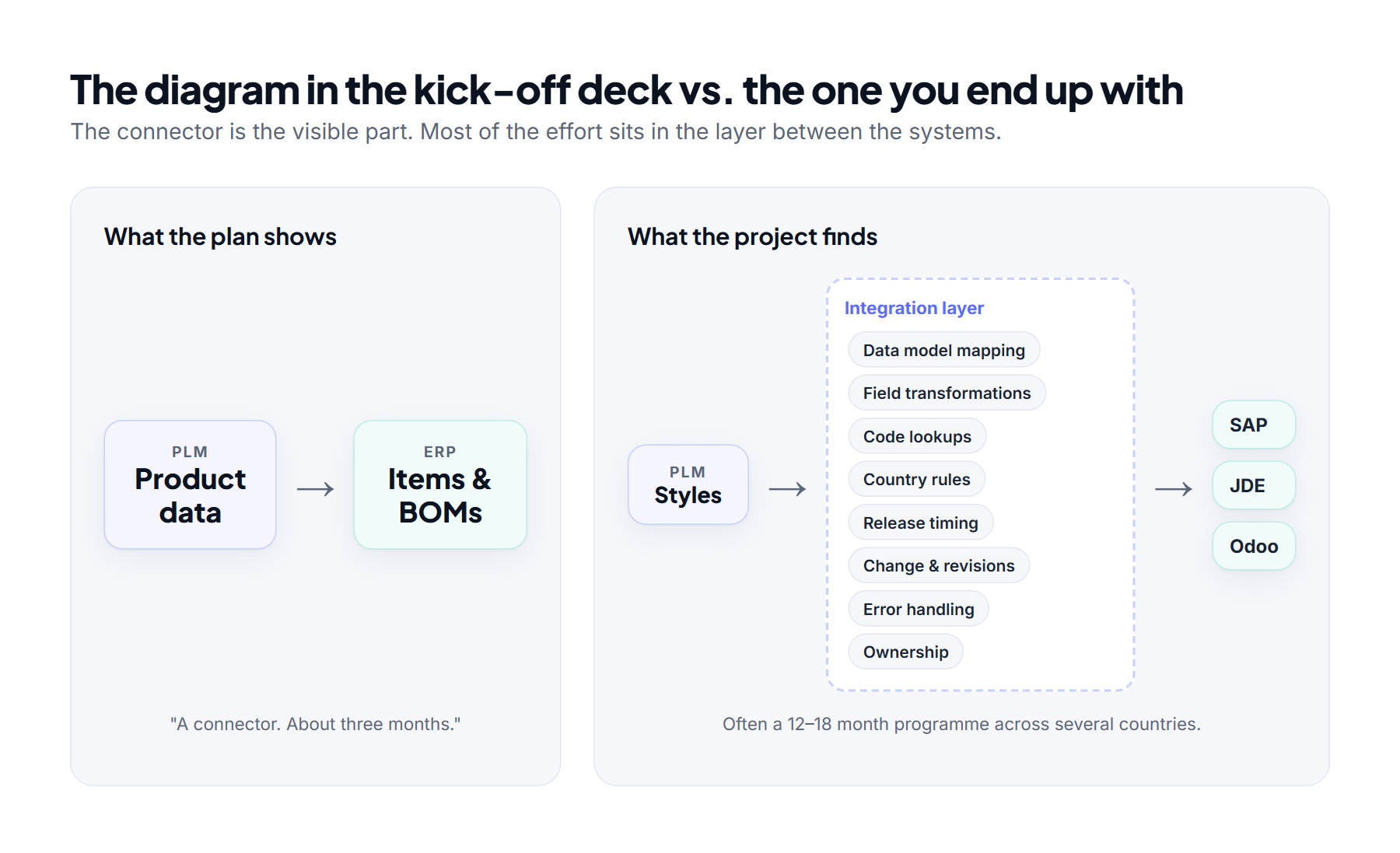
Every ERP–PLM integration starts with the same slide: two boxes and an arrow. Product data is created in PLM, it flows to the ERP, and the project is scoped as a connector that should take a few months.
Then the team starts looking at real data. “Product” turns out to mean something different in each system. Every country has its own tax codes, invoicing rules and labelling requirements. A single field in PLM needs to become three fields in the ERP, in a different format, with a value that depends on the plant. The three-month connector quietly turns into a 12 to 18-month programme.
This article looks at why that happens, using common pairings like Centric PLM with SAP, JD Edwards and Odoo, and what you can do to keep the effort under control.
1. PLM and ERP don’t see the product the same way
Most of the difficulty is about meaning, not technology. The two systems are built for different jobs:
- PLM is built for design. It handles concepts, styles, colourways, specifications, development BOMs, samples and approvals. The data is meant to change, often.
- ERP is built for transactions. It handles released items, plants, warehouses, costing, routings, purchasing and financial postings. The data has to be stable, validated and auditable.
Take a simple T-shirt in Centric PLM, which is widely used in fashion, footwear, retail and consumer goods. It’s one style with three colours and four sizes, and each combination can have its own BOM details and supplier options. In PLM, that’s one record. Downstream, it’s twelve sellable SKUs, and each ERP stores them differently:
- SAP S/4HANA (Fashion and Retail) creates a generic article with variants. Colour and size become variant characteristics, and much of the data is repeated for each plant and sales organisation.
- JD Edwards keeps company-wide data in the item master and plant-level data in separate branch/plant records. So the same item exists once per branch/plant, and the colour and size variants are either separate items or matrix/parent items.
- Odoo uses one product template with attributes for colour and size, which generate the twelve variants.
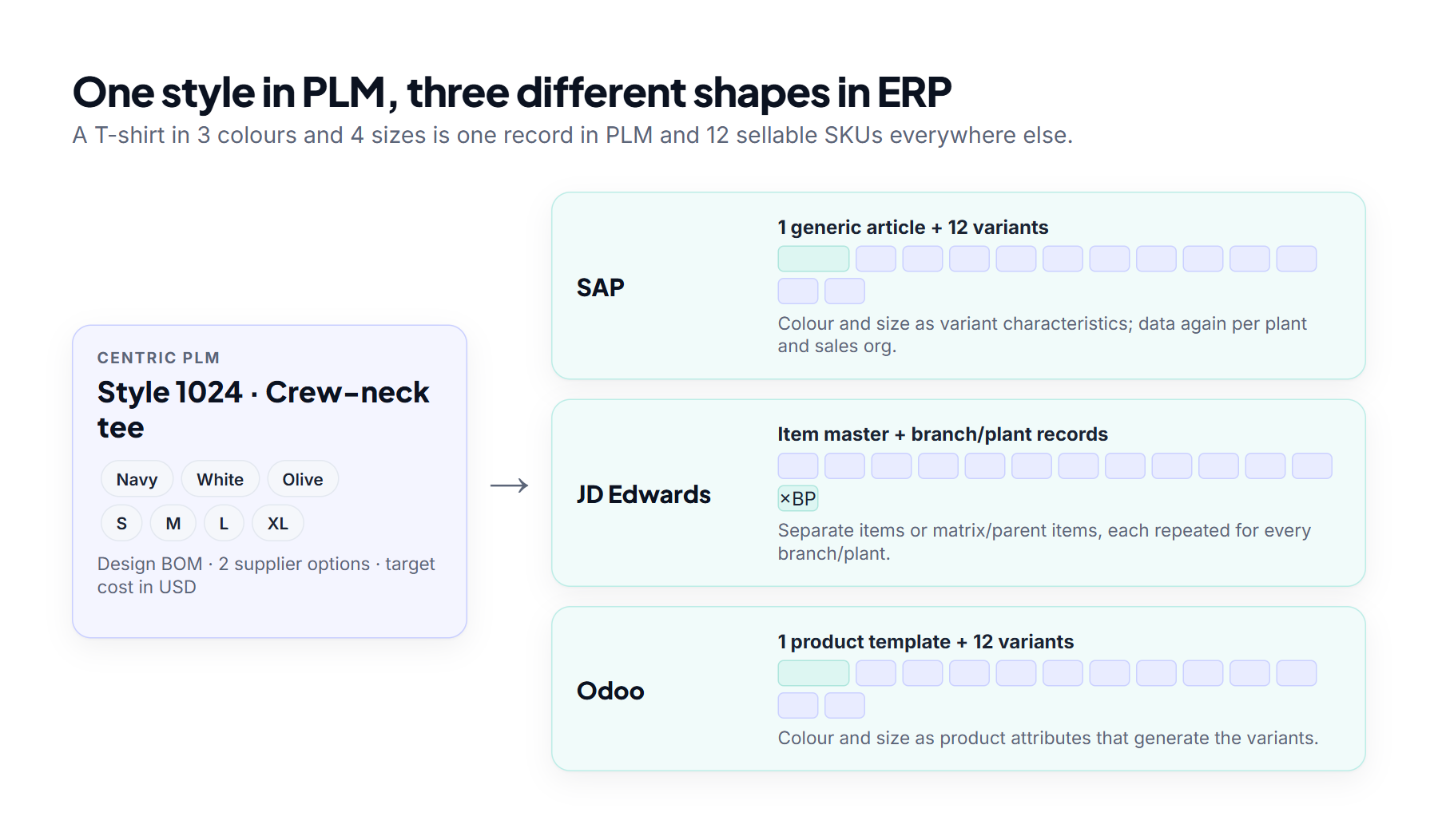
None of these line up one-to-one. What you’re really building is a translation between two business models, and that’s where the effort hides.
2. Data mapping is where the real work is
Mapping usually gets planned as a spreadsheet task. In practice it’s a series of design workshops, because every row raises a question someone has to answer.
The structural questions
- Style, material or variant? One Centric PLM style could become a single configurable material, a generic article with variants, or one material per SKU. Each choice changes how planning, pricing and reporting work later.
- Design BOM or manufacturing BOM? The PLM BOM shows what the designer intends. The ERP needs what the factory actually uses, including scrap, alternative components and plant-specific parts. Many teams find out mid-project that these aren’t the same data at all.
- Whose hierarchy? Odoo product categories, SAP material groups or merchandise categories, and JD Edwards category codes each serve a different purpose. They rarely match the PLM’s own product hierarchy.
- Who owns which field? Is cost owned by PLM or ERP? The supplier? Lead time? The customs code? If nobody decides, data ends up flowing back and forth, overwriting itself.
How the core concepts typically map
| PLM concept | SAP | JD Edwards | Odoo |
|---|---|---|---|
| Style / product | Material master; in S/4HANA Fashion, a generic article | Item master plus branch/plant records | Product template |
| Colour / size | Variant characteristics or separate materials | Separate items, or matrix/parent items | Product attributes and variants |
| BOM | BOM with plant and usage | Bill of material per branch/plant | Bill of materials (Manufacturing app) |
| Supplier | Business partner (supplier) and purchasing info records | Supplier in the address book, plus supplier/item relationships | Vendor contact and vendor pricelist on the product |
| Cost | Standard price or moving average price | Item cost by cost method | Standard, average (AVCO) or FIFO |
Many of these fields hold coded values (statuses, categories, units, user-defined codes) rather than free text, and each system codes them differently. We cover how those lists work in How Drop-Downs Work Across Enterprise Systems.
3. Every country multiplies the work
A single-country, single-plant integration is hard enough. Rolling out across countries multiplies the effort, because ERP setups are localised while PLM usually holds one global product.
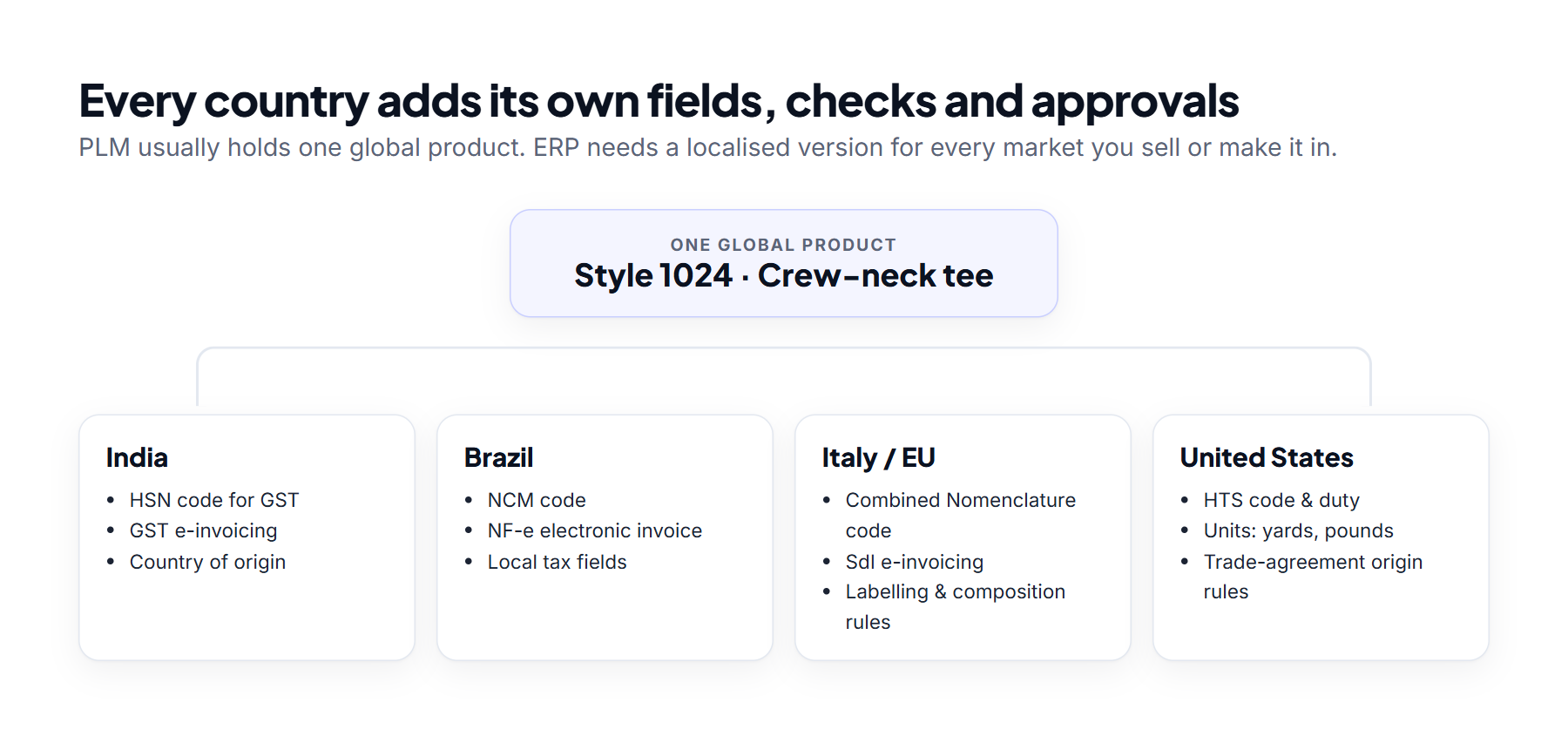
Typical country-driven requirements include:
- Customs and tax codes. HS codes internationally, HSN codes for GST in India, NCM codes in Brazil, the EU’s Combined Nomenclature and HTS codes in the US. They often need to be on the product before it ever reaches the ERP.
- Country of origin and trade preferences. Whether a product qualifies for a free-trade agreement depends on where its materials come from and where it’s made. That information starts in PLM (the BOM and suppliers) but is used in ERP and trade systems.
- Product compliance. Restricted chemicals, labelling, fibre composition, care labels and sustainability reporting all vary by market. The data usually lives in PLM, but sales and shipping in ERP depend on it.
- E-invoicing and local fiscal fields. Brazil (NF-e), India (GST e-invoicing for businesses above the turnover threshold) and Italy (SdI) all require electronic invoices built from correct master data. SAP and JD Edwards localisations expect these fields to be filled in; in Odoo, they come from country-specific localisation modules.
- Language and units of measure. Descriptions in several languages, metres against yards, kilograms against pounds, and different decimal conventions.
- Currency and costing. Landed cost, duties and freight differ by country and plant. PLM might hold a target cost in US dollars while each ERP plant needs its own cost in local currency.
Each country you add brings new mandatory fields and checks. The integration has to handle all of them without breaking the single global product that PLM is built around.
4. One field is rarely just one field
Field mapping looks simple until you open the actual data. These are the transformations that catch teams out most often:
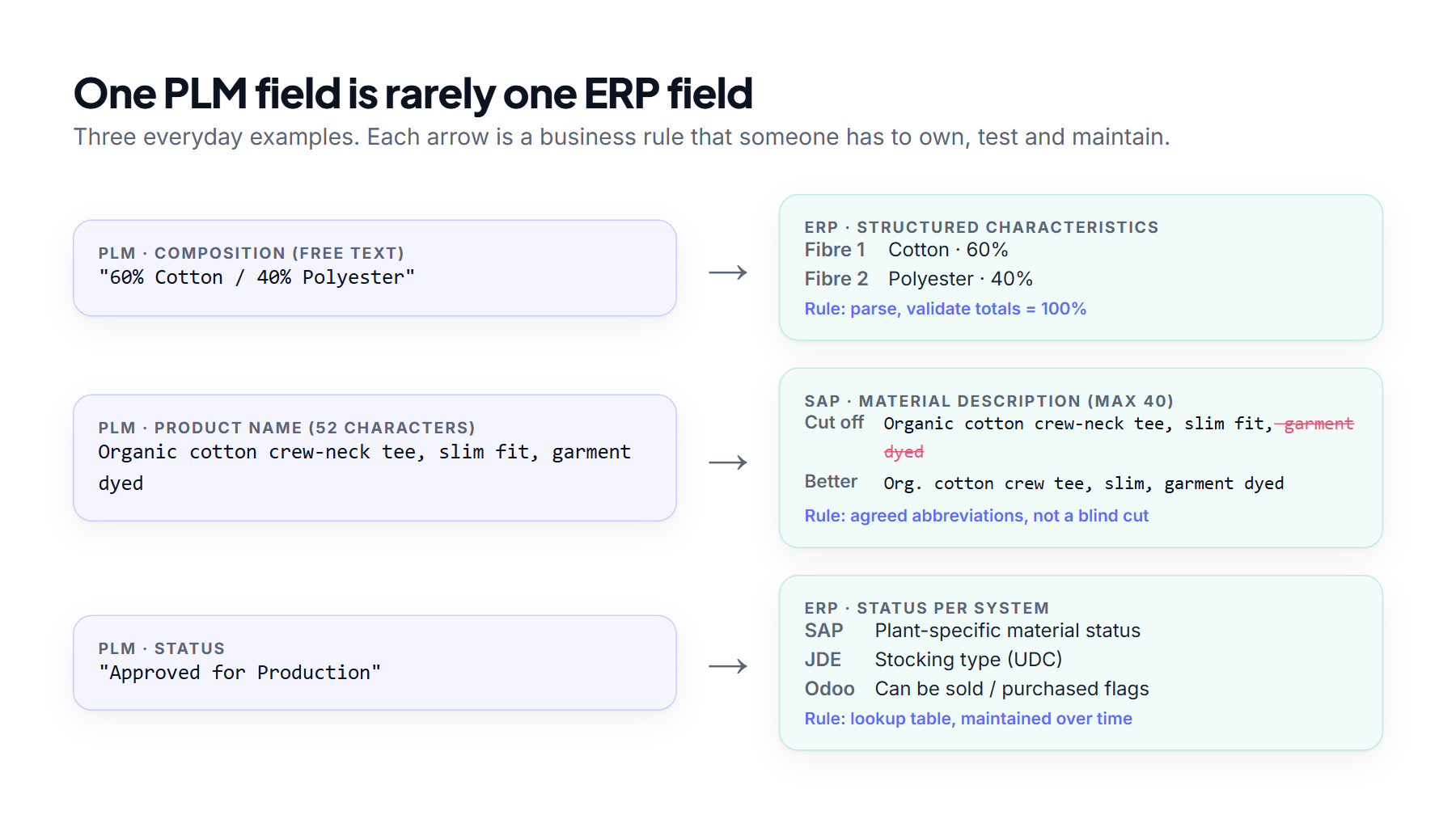
- Format limits. SAP’s standard material description is 40 characters. Names, character sets, date formats and case sensitivity all differ between systems. Cutting text off at the limit usually produces nonsense; you need agreed abbreviations.
- Code translation. A PLM status such as “Approved for Production” has to become a plant-specific material status in SAP, a stocking type in JD Edwards, or a set of flags in Odoo. Those lookup tables need an owner and regular upkeep.
- Splitting and merging. A composition field like “60% Cotton / 40% Polyester” may need to be broken into structured characteristics, or the other way round.
- Conditional rules. The right value for a field may depend on the country, plant, product type or lifecycle stage.
- Unit conversions. The base unit, purchase unit and sales unit are often different, and PLM may not store all of them.
- Fields PLM never captures. ERPs need values such as MRP type, procurement type, valuation class or lot size. Someone has to decide where they come from and when they’re set.
Every one of these rules is business logic. When they’re scattered across PLM customisations, ERP user exits and one-off scripts, nobody can see them, and they become a long-term maintenance risk. That’s why the rules need a proper home.
5. You need an ETL layer, not just a connector
All of those transformations have to run somewhere. In most successful projects, that somewhere is an ETL layer (extract, transform, load): a dedicated step between PLM and the ERPs that takes product data out, reshapes it for each target system, checks it and loads it. A connector that simply passes PLM fields across can’t do this, because PLM and ERP don’t share a data model.
What the ETL layer does
- Extract. Reads released styles, BOMs, suppliers and costs from PLM through its API or scheduled exports. Ideally it only picks up what has changed since the last run, rather than the whole catalogue every time.
- Transform. Applies the mapping tables, code lookups, unit conversions, agreed abbreviations and country rules. This is where one T-shirt style becomes twelve SKUs, and where ERP-only fields such as MRP type or valuation class are filled in from agreed rules.
- Validate. Checks mandatory fields, code values and field lengths before the ERP sees anything, and rejects bad records with a reason a business user can understand.
- Load. Posts data in dependency order: the item before its branch/plant records in JD Edwards, the material before its BOM and purchasing info records in SAP, the product template before its variants in Odoo. Failed records are logged and can be retried.
- Reconcile. Confirms afterwards that what arrived in each ERP matches what left PLM, so gaps are found in hours rather than weeks.
Staging: the part teams skip and later regret
A good ETL setup keeps a staging area between the two systems. It lets you see exactly what is about to be loaded, re-run a failed batch without going back to PLM, and test a new country’s rules without touching the production ERP. It also gives auditors and support teams a record of what was sent, when and why.
ETL, APIs or middleware?
These aren’t competing choices. A common pattern is to use bulk ETL for the initial migration of the existing product catalogue, often tens of thousands of items, and an API- or event-driven flow for day-to-day releases and changes. Many integration platforms (iPaaS) handle both. On the ERP side, the native load routes differ: SAP offers the S/4HANA Migration Cockpit for initial loads and APIs or IDocs for ongoing updates, JD Edwards has interoperability (Z) tables for batch loads, and Odoo takes imports or calls to its JSON-2 API.
One caution: an ETL tool runs the rules, but it doesn’t decide them. The ownership and mapping decisions from the earlier sections still have to be made by the business. The ETL layer just makes them visible, testable and repeatable.
6. Where projects slow down
Even once the mapping is agreed, a handful of issues tend to stall progress.
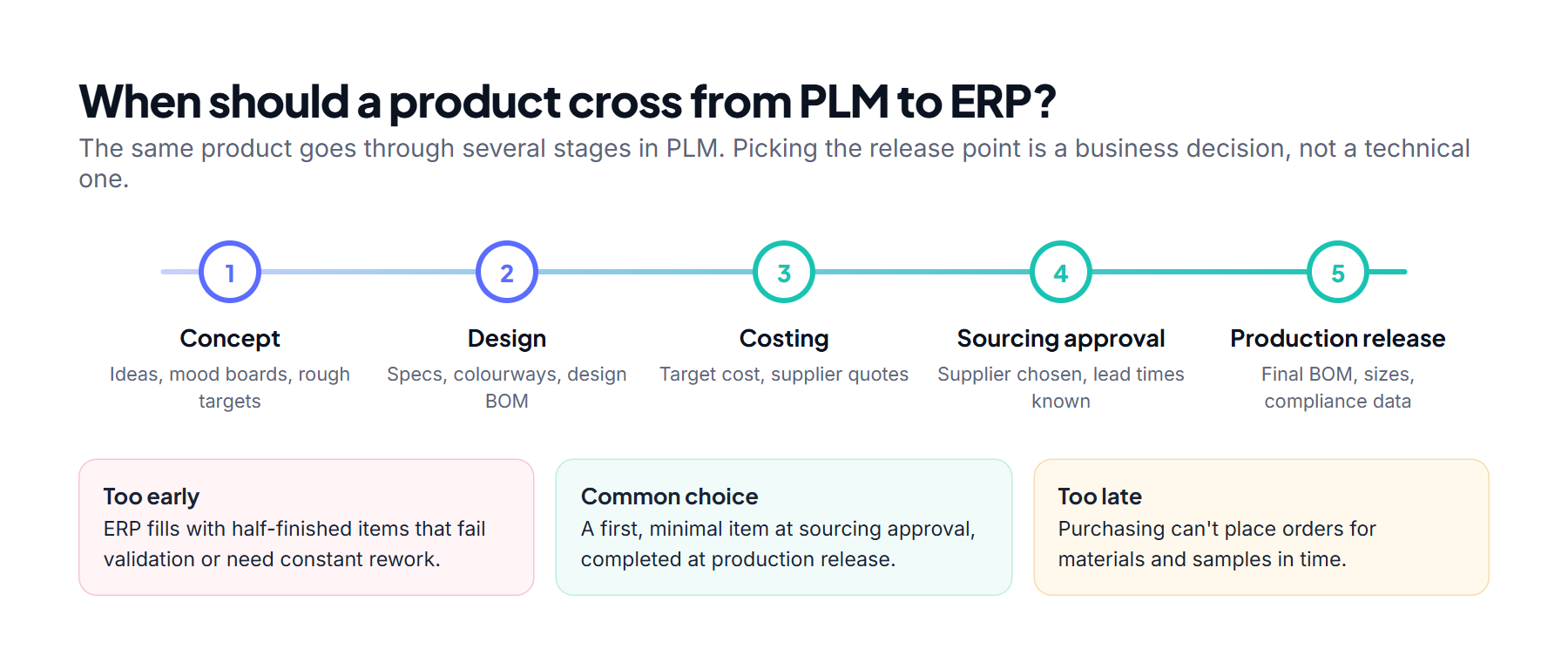
Deciding when a product crosses over
Products exist in PLM long before they’re ready for the ERP. When to send them is a business decision, and it shapes the whole integration.
Revisions and change control
PLM expects frequent changes; ERP prefers controlled ones. Keeping engineering changes, BOM revisions, effective dates and supplier switches in sync without creating duplicates is one of the hardest parts of any integration.
Two-way flows
Most projects start with PLM sending to ERP. Before long, the business wants information sent back too: actual costs, stock, order status, supplier performance. Two-way sync brings questions of which system wins in a conflict, who owns each field, and how to stop updates bouncing back and forth.
Errors business users can actually fix
When a record fails ERP validation (a missing tax code, an invalid unit), someone in the business needs to see it, understand it and fix it, not just IT. Integrations that fail silently tend to surface weeks later as problems in production planning.
Different technology on each side
- SAP: OData APIs, IDocs and BAPIs.
- JD Edwards: Orchestrator (REST), business services, and interoperability tables for batch loads. Item master and branch/plant records are separate loads that have to run in the right order.
- Odoo: Odoo 19 introduced the JSON-2 API and deprecated the older XML-RPC and JSON-RPC interfaces, so new integrations should target JSON-2. On Odoo Online, external API access requires the Custom plan.
Each one has its own throughput limits, authentication and error behaviour. Middleware (an iPaaS or ESB) helps hide these differences, but it’s one more layer to design, test and run.
Testing with realistic data
Good testing needs realistic products across several countries and plants. Test environments are often incomplete, and re-testing after every change gets expensive quickly.
7. Each ERP adds its own complications
- SAP is deep and strict. Its material master is powerful but demanding, and its views by plant, sales organisation and storage location multiply the data you have to supply.
- JD Edwards is flexible but distinctive. Branch/plant logic and user-defined codes (UDCs) need careful alignment with the value lists in PLM.
- Odoo is modular and easy to customise, which also means no two implementations are quite the same. Standard connectors rarely fit without changes, and the depth of localisation varies by country.
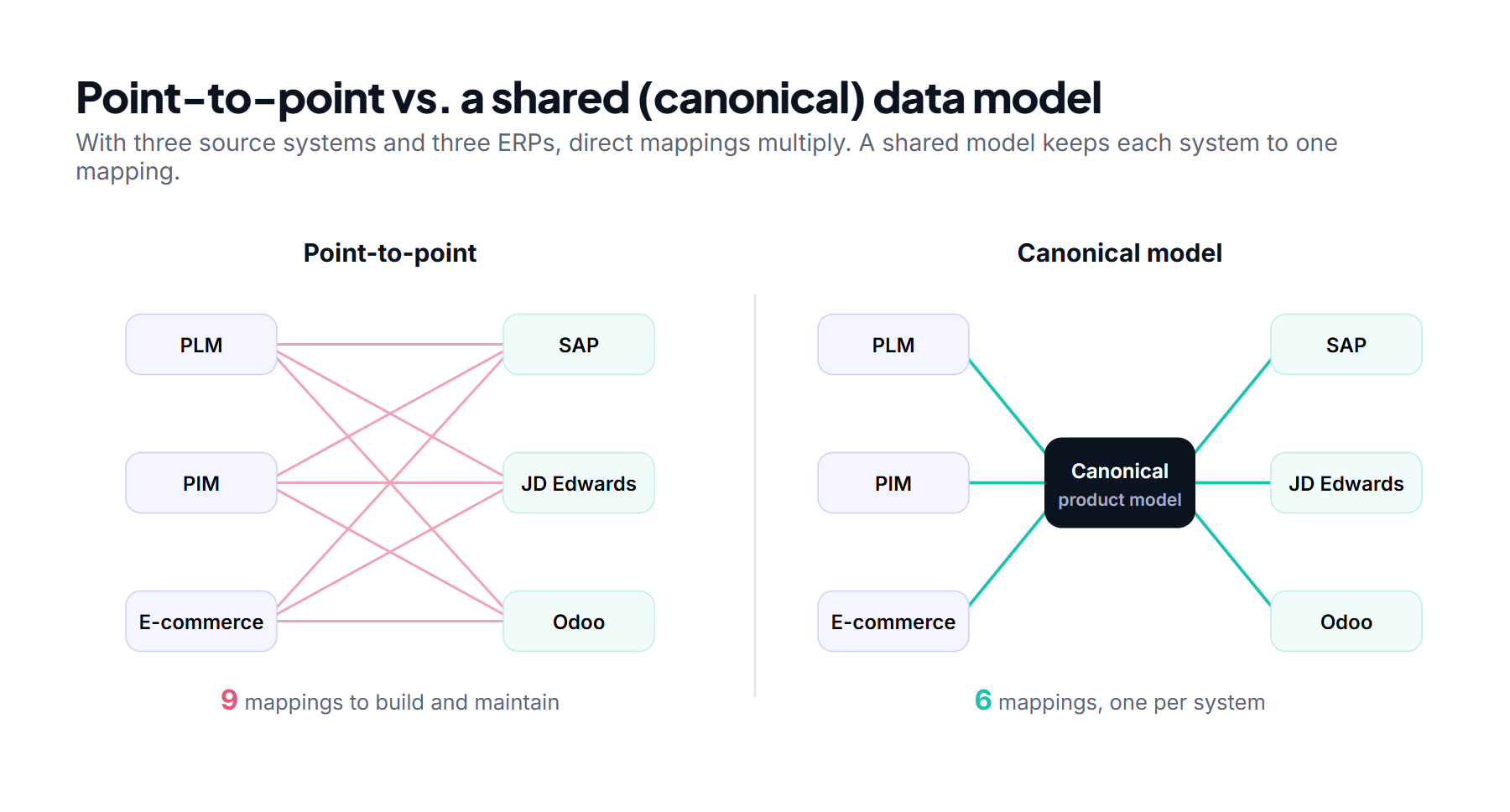
- Several ERPs at once. Plenty of companies run SAP in one region, JD Edwards in another and Odoo in a recently acquired business. PLM then needs a shared, neutral product model that serves all of them, which is a design project in its own right.
8. How to keep the risk under control
You can’t make this simple, but you can make it predictable:
- Decide data ownership first. Build a field-by-field list showing which system owns each value, which systems only read it, and at what lifecycle stage ownership changes.
- Use a shared product model. Avoid separate mappings between every pair of systems. A neutral model saves rework when you add a country or another ERP.
- Start with a thin slice. One product category, one plant, one country. Prove the pattern, then scale it.
- Treat country requirements as real scope. Bring in trade compliance, tax and finance teams at the start, not a month before go-live.
- Give transformations a home. Run them in a dedicated ETL or integration layer with a staging area, not in custom code on either side. Keep the mapping tables where business users can read them, with version history and a named owner.
- Design for errors from day one. Dashboards, alerts and a clear way for the right person to fix a failed record.
- Clean the data before you connect it. Integration exposes data quality problems that were already there. Fix them first.
- Budget for change. Product ranges, regulations and ERPs keep changing. Plan for ongoing maintenance, not just a one-off project.
The short version
ERP–PLM integration is hard because it connects two very different views of the same product, then stretches that connection across countries, regulations, plants and systems. The visible part (APIs and connectors) is usually the smallest part of the work. The real effort is in data mapping, the ETL logic that transforms and validates each record, ownership and the local rules that only show up once you look closely.
Teams that accept this early, scope honestly and treat the integration as a business change rather than an IT task are far more likely to finish on time and on budget.
Frequently asked questions
What is ERP–PLM integration?
It’s the connection between a Product Lifecycle Management system, where products are designed and developed, and an Enterprise Resource Planning system, where they’re sourced, made, costed and sold.
Why do ERP–PLM integration projects overrun?
Mostly because the two systems model products differently, country-specific requirements weren’t in the original scope, field transformations are more complex than expected, and nobody agreed who owns which data.
Is point-to-point integration a good idea?
It’s fine for one PLM talking to one ERP. With several systems or countries it scales badly, and a shared (canonical) model or a middleware layer is usually the better choice.
Do we need an ETL tool for ERP–PLM integration?
In almost every case, yes. PLM and ERP structure product data differently, so something has to extract it, transform it for each ERP, validate it and load it in the right order. That can be a dedicated ETL tool, an integration platform or well-governed custom code, but it should be one visible layer with a staging area, not logic scattered across both systems.
Can one PLM integrate with SAP, JD Edwards and Odoo?
Yes. Each ERP needs its own mapping and technical adapter, but a shared product model keeps the overall effort manageable.
What should we integrate first?
Core item and BOM data for one plant and one country. Then add suppliers, costs, change handling and more regions once the pattern works.